Importing Content
Import existing content from SCORM, PDF, and PowerPoint into your courses
Importing Content
When building courses in Konstantly, besides creating course elements from scratch, you can import content from other popular course-building solutions. At the present moment, you can import content in the following formats:
- SCORM
- PPTX
Data in the input files is parsed and separated into individual objects on different layers, such as images, videos, objects, and text.
PowerPoint Picture Presentation Format
If you'd like to have your imported PowerPoint file non-editable in the system, but looking just like the original, please follow the instructions below:
- Open your PowerPoint file
- Go to File → Export → Change File Type
- You will see a window like the one in the picture below
- Among "Presentation file types" choose the lowest one in the right column - "PowerPoint Picture Presentation"
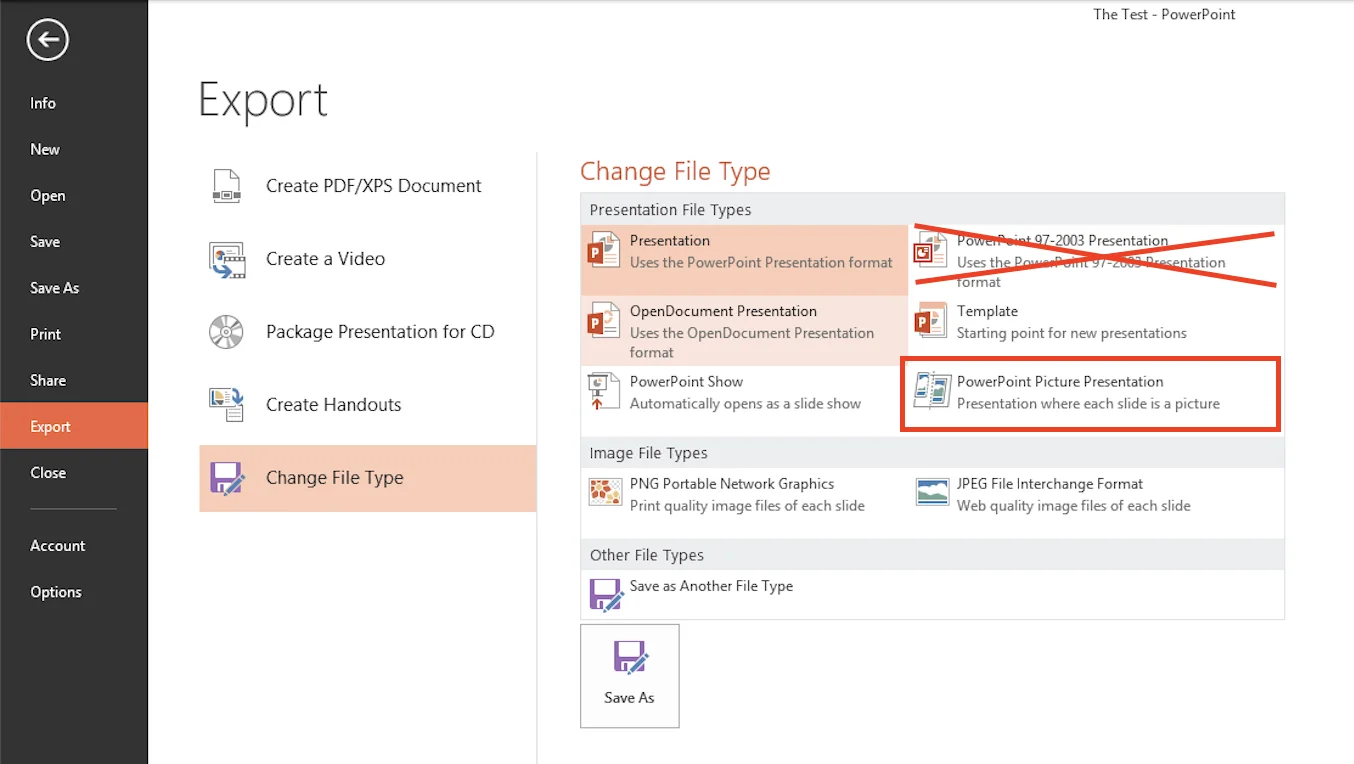
- Import this new file to your course
How to Import
To import content, open the course in the course builder (choose Update first if it is published), then add the Import element to the course. Browse to the file you want to import, then click Open. The imported lesson shows where it is – converting, ready, or failed with the reason – so you always know whether it is safe to open. Once the import has finished, you will be able to view and edit the imported content, and Ask in the lesson editor can read the imported slides.